Mailboxes vs alias
To enable mailbox protection in Cyber Guardian for an email domain, you need to load the list of mailboxes in the domain and keep it updated over time. This will be the list of active mailboxes of the domain. To do this you must upload or synchronise* all existing mailboxes, each with its associated aliases if any.
A mailbox is an email account created on your server to receive and send emails. Mailboxes store the received emails in an inbox. There may be personal mailboxes such as firstname.lastname@sample.com, and there may be group or departmental mailboxes such as administration@sample.com with their own inbox or working as distribution lists. Active mailboxes will receive mail already filtered by protection and consume protection license in Cyber Guardian.
For any particular mailbox, there may be associated aliases, which are alternative email addresses created on your server as mailbox "nicknames" to diversify their use without having to create multiple accounts. Aliases do not have their own inbox, they simply redirect emails to their associated mailbox and do not consume protection license in Cyber Guardian. For example, mailbox firstname.lastname@sample.com might have an alias like hhrr@sample.com to receive CVs from external candidates without publicly exposing personal address.
*To upload the list of active mailboxes you can do it one by one or massively by importing a file. If you import the list through a file it must have one mailbox per row, followed by its associated aliases, if any. To synchronise the mailboxes with your Entra ID, see here.
WARNING:
• It is very important to keep this information updated.
• If a mailbox or alias is not included in this list it will not receive emails.
• If a mailbox or alias is incorrectly configured, emails could reach the wrong recipients.
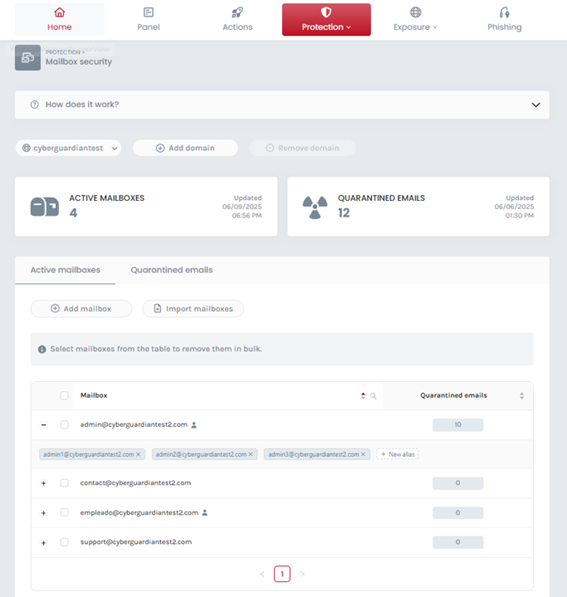
In this example you can see 2 personal mailboxes and 2 departmental mailboxes. If you have configured aliases for any of them, you will see them displaying more information by clicking on [+].