What is email quarantine and how do I manage quarantined emails?
More than 90% of security breaches start with an email message, which is the main attack tool for cybercriminals.
When an incoming email is detected as being malicious, either because it has a high probability of being phishing with misleading links or having malicious attachments and malware that can steal credentials, Cyber Guardian automatically removes that email completely, preventing it from reaching the user's inbox.
However, when an incoming email is suspicious or has a high probability of being spam, Cyber Guardian automatically holds that message in quarantine preventing it from reaching the user's inbox. Quarantined emails will be retained for 30 days before being permanently deleted. It is therefore advisable to check the quarantined emails or when an employee notifies the lack of a specific incoming mail.
In the "Mailbox Security" section you can review all the messages held in quarantine and you can preview and permanently delete these messages.
Cyber Guardian updates the quarantine information every 15 minutes with new emails that may have been held. Sometimes it can take 45 minutes from the time a malicious email is received until it is displayed in quarantine.
Quarantined emails will be retained for 30 days before being permanently deleted.
The table showing the list of quarantined emails is paginated. The first page will show the most recent emails. At the bottom of the table you can easily move between the different pages and configure to your liking how many emails to view per page.
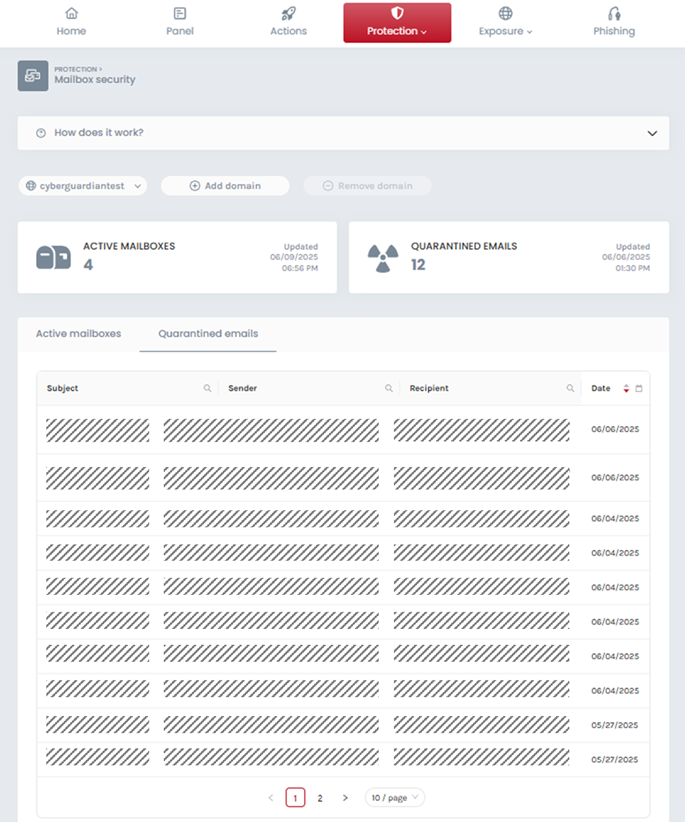
By clicking on the magnifying glass icon in each column you can search emails by subject, sender, recipient and date or date range. The result of a specific search can be shared with other Cyber Guardian administrators. To undo the search simply press the Restart button under the corresponding search field.
By clicking on one of the quarantined messages you can safely view it and decide whether you want to release the email to the final recipient or delete it permanently from the quarantine. Our recommendation would be not to release quarantined emails. However, if you consider that you should release the message so that it reaches its recipient, make sure that the sender is trustworthy, consider the risks and make this decision at your own risk.