Assign device and navigation protection licenses
In the “Device security” section you can assign and send device protection and/or navigation licenses to the administrator and/or employees according to the different device types assigned and available licenses.
Select one or more recipients and press the Assign protections button:
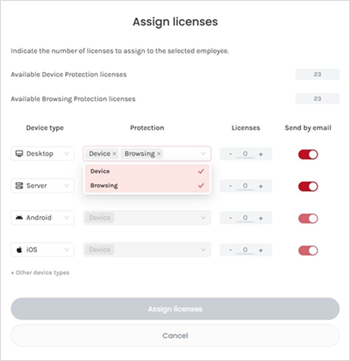
Choose the device type (Desktop, Server, Android or iOS), the protection (Device or Browsing* or both*) and the number of licenses to assign to each of the selected recipients.
(*)Only for desktop devices
For desktop devices or servers you can assign and send all licenses to the administrator or directly to each employee.
For iOS or Android mobiles or tablets, it is important that device protection licenses reach employees’ mobile devices, so we recommend that you send each employee their own.
If you send by email desktop and/or server licenses to each employee, they will receive personalized emails, with instructions to install the protections on each of their devices, including a unique installation code and download links. Remember that running the installer will require local administration privileges.
Instead, sending all licenses for desktop devices and/or servers to the administrator has the following advantages:
- A single installation code (token) for all devices.
- To be able to install without the need to involve employees.
- Install unattended in the case of Windows or Mac devices.
Check more info for Windows, for Mac, for Linux, Android or iOS.
If needed, it is possible to revoke licenses sent for desktop devices or servers that have not yet been installed to be able to re-send them to other users or change the type of device for which they are intended. For more information please check here.
Supported operating systems: Windows Desktop / Server, MacOS, Linux Desktop / Server, Android and iOS. For more information, check here.