How do I uninstall Cyber Guardian protections on desktop devices and servers?
IMPORTANT: Do not format computers without having uninstalled the protections correctly as explained here.
If Cyber Guardian protections need to be uninstalled on a desktop or server device, you must first expressly authorize their uninstallation from Cyber Guardian console. Otherwise, uninstallation is not allowed. Please note that you must wait at least 60 minutes after installing before you can uninstall.
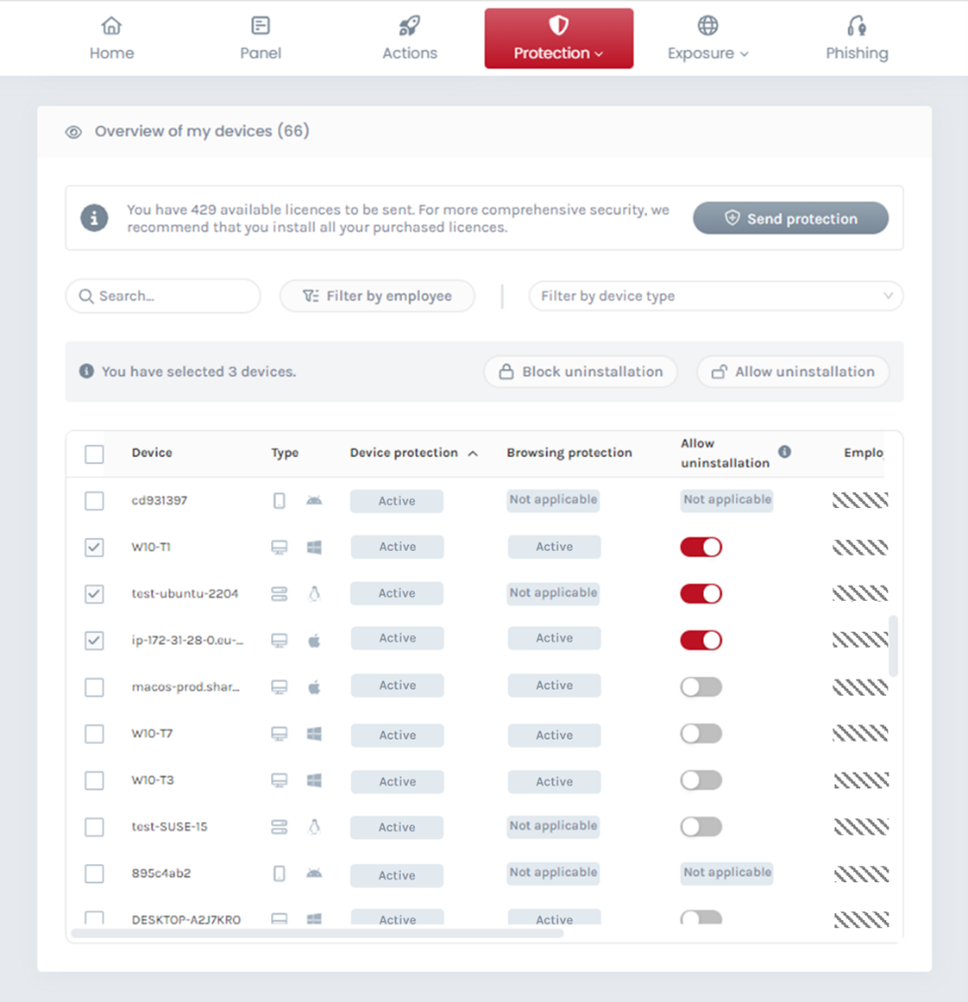
In order to do this, go to Device Security section, and enable the corresponding Allow uninstallation switch in the Devices overview table. You can do this one by one or in groups by using the filters and searches to select groups of devices and then hitting the Allow uninstallation button.
Once this is done, you can uninstall Cyber Guardian protections on those authorized desktop or server devices.
Graphical uninstallation
Then follow these steps to uninstall using the graphical installer on Windows Desktop, Windows Server, or Mac. Download the latest version of the graphical installer from your download area and open the graphical installer, select which protection you want to uninstall and press the "Uninstall" button.
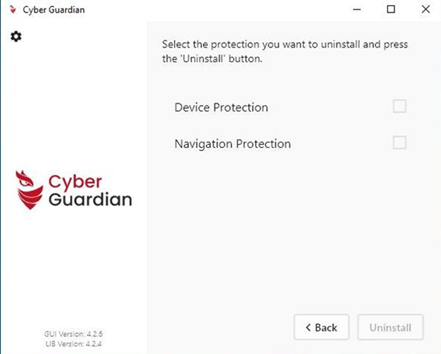
In a few seconds the protection is uninstalled.
After uninstallation is completed, the corresponding licenses are released so that they can be sent again to any employee. The uninstalled devices will desappear automatically from the Devices overview table.
Unattended uninstallation
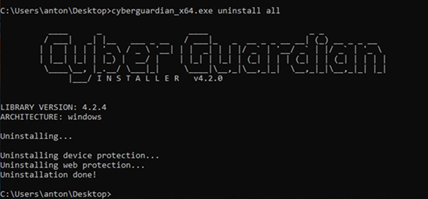
If you prefer an unattended uninstallation for Windows Desktop or Windows Server, use the command-line uninstallation. Download the latest version of the Windows unattended installer from your download area and go to Windows CMD console and execute uninstallation with this command (in administration mode and with the same user that ran the initial installation) depending on which protection you want to uninstall:
- Installer versions after 4.2: cyberguardian_cli_x64.exe uninstall [device-protection|web-protection|all]
- Installer versions earlier than 4.2: cyberguardian_cli_x64.exe uninstall
In order to uninstall Cyber Guardian on Mac download the Mac installer from your download area and uninstall using this command:
- Installer versions after 4.2: sudo ./cyberguardian_cli uninstall [device-protection|web-protection|all]
- Installer versions earlier than 4.2: cyberguardian_cli uninstall
In order to uninstall Cyber Guardian on Linux Desktop or Linux Server download the Linux installer from your download area and uninstall using this command:
Installer versions after 4.2:
- x64: chmod +x ./cyberguardian_x64.run;sudo ./cyberguardian_x64.run uninstall [device-protection|web-protection|all]
- arm64: chmod +x ./cyberguardian_arm64.run;sudo ./cyberguardian_arm64.run uninstall [device-protection|web-protection|all]
Installer versions earlier than 4.2:
- x64: chmod +x ./cyberguardian_x64.run;./cyberguardian_x64.run uninstall
- arm64: chmod +x ./cyberguardian_arm64.run;./cyberguardian_arm64.run uninstall
After uninstallation is completed, the corresponding licenses are released so that they can be sent again to any employee. The uninstalled devices will desappear automatically from the Devices overview table.
IMPORTANT: Do not format computers without having uninstalled the protections correctly as explained here. If devices are formatted before uninstallation has been successfully executed, they will not disappear from the list of installed devices and the license won't be released for reuse on another device.